
Premium Report - Items Frequently Bought Together
Items Frequently Bought Together
This report is for merchants who are looking to see the most popular items bought together as part of the same order.
Using this report, you can see which items that are sold together on an order, ranked by the number of orders.
You can also see this divided into first time vs returning orders to see which are more popular combos among first time vs returning customers.
You can find this report under Orders in the left-hand menu.
As a Premium Report, this is available on all Paid Plans of Report Toaster. If you aren't signed up, follow these steps to upgrade your account.
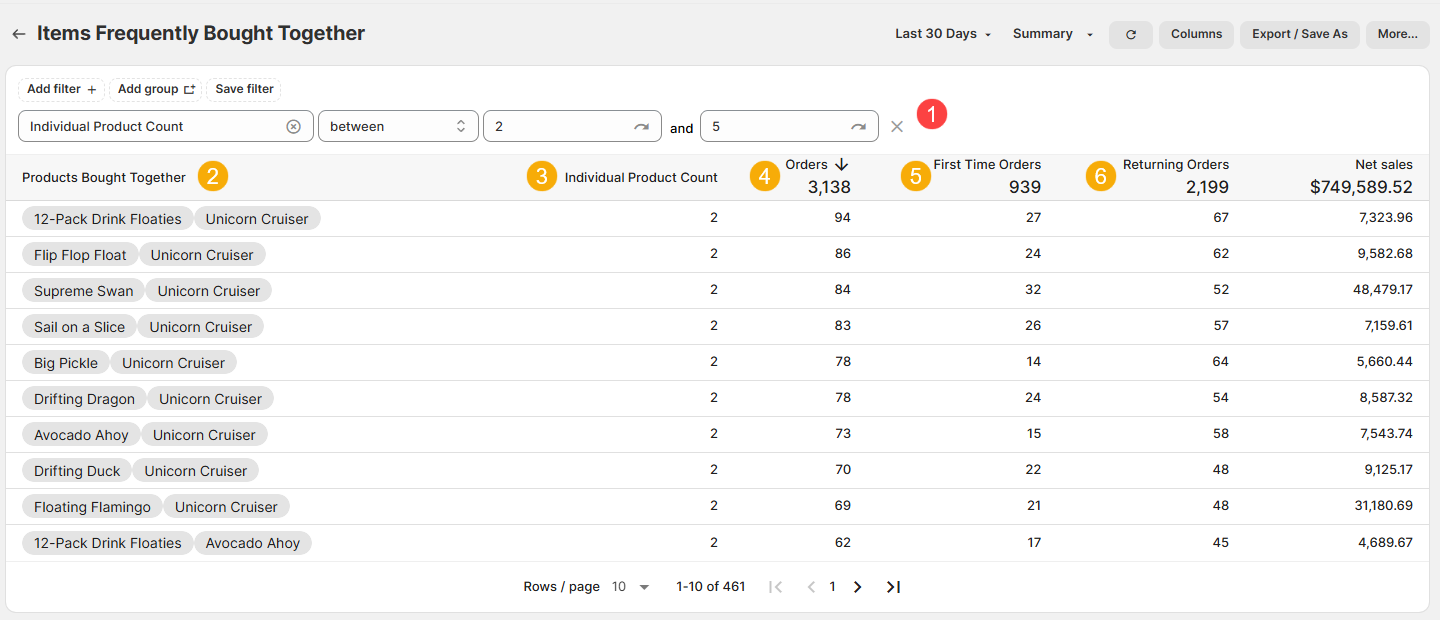
(click image to enlarge)
As an Order report, bear in mind that the date range (top right) is based on the date for when the Order was placed.
This is important for things like exchanges or adjustments where other items may be added/removed from the order, as everything will be dated to the original purchase.
Here is what you need to be familiar with to understand the Items Frequently Bought Together report:
1.) Individual Product Count (FILTER): By default, this filter limits the results to only display orders that have between 2 and 5 individual products on them so you can see popular combinations
This keeps orders with only 1 item out of the report, as well as those with a lot of products (because then you start getting too many combinations with no patterns).
2.) Products Bought Together: The Product Titles of the products included on an order, arranged alphabetically (to avoid duplicates).
For example, looking at the first row we can see there were 94 Orders that had a 12-Pack Drink Floaties and a Unicorn Cruiser (no other items on the order).
3.) Individual Product Count: The number of unique product titles on that order.
This is different from Line Item Count, which would count say, a Pink Unicorn Cruiser and a Blue Unicorn Cruiser as 2 separate Line Items.
For example, there were only 2 individual products on those 94 orders in the first row.
4.) Orders: The number of Orders that had that combination of individual product titles.
For example, 83 Orders had the Sail on a Slice and Unicorn Cruiser.
5.) First Time Orders: The same as Orders (above), but limited to only Orders from First-Time customers.
For example, of those 92 Orders, 26 were orders from First Time Customers.
6.) Returning Orders: The same as Orders (above), but limited to only Orders from Returning customers.
For example, of those 92 Orders, 57 were orders from Returning Customers.
Like all Report Toaster reports, these reports are fully customizable - so you can add/remove columns, introduce a filter or change the sort to suit your individual needs. See our basic guides here for more info.
For other premium reports you can add to your account, check out our other article guides here.